Showing posts with label Alexa. Show all posts

Thursday, 13 June 2013

How to Claim Your Blog / Website on Alexa.com?

Claim Site on Alexa
Alexa.com is the top most tool to check website ranking. Being is blogger you must need to improve your alexa ranking because it shows the authority of your blog/website and even advertisers also check your alexa ranking to know about your blog traffic and page views before buying an ad space on your blog. Ranking under 100K is really good which shows the value of your blog. The first step to improve your ranking is to claim your site on alexa and submit your blog details. Alexa have its own systems that index new sites in their database but submitting your site manually is the best way to improve alexa ranking. Here is the tutorial on how to submit blog in alexa. Let's start the tutorial.

Claim Your Blog on Alexa


Below are some steps which you have to perform to submit your website in alexa.
  1. Visit Alexa.com and create an account.

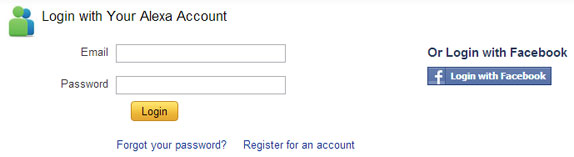
  2. Now log in to your account. If you don't want to create new account then you can also log in with your facebook account.

  3. log in to alexa

  4. Now go to alexa site owner page.

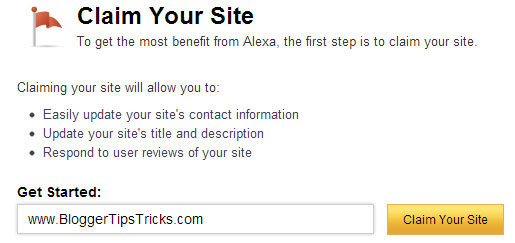
  5. Now enter your blog/website domain name and click on Claim Your Site button as shown in below screenshot.

  6. claim your site
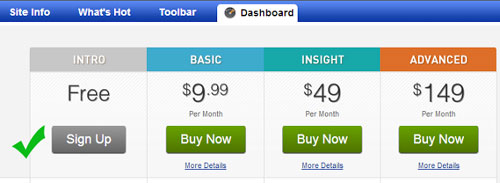
  7. On the next page you will get all the plans and prices that alexa offers. As being a blogger I recommend you to choose Free plan. Click on Sign Up button under "Free Plan".

  8. choose alexa plan

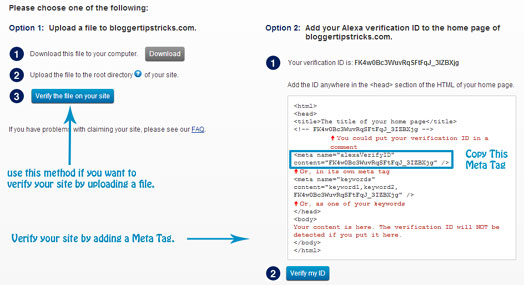
  9. Once you click on sign up button, on the next page you will see two verification options.

  10. alexa verification

  11. If you are a blogspot user then choose Option 2 and add a meta tag in your blog template under <head> section. Before adding meta tag please backup your blog template.

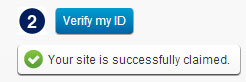
  12. After adding meta tag in your blog, go back to alexa and click on "Verify my ID" button.

  13. If everything is right, you will receive a confirmation message like below picture.

  14. alexa confirmation

  15. Click on continue to add your site details. Fill all the details like your site title and description, alexa rank in country and fill your public contact information.

  16. You are done!

Final Words!


This was all about how to claim site / blog on alexa. If you want to improve your alexa ranking then submit you site in alexa today. Please leave your valuable feedback and comments about this tutorial. Thanks! Peace :)
Read More

Sunday, 26 May 2013

SEO Guidelines For New Website/Blogger

SEO Guidelines For New Website/Blogger

Today I am going to tell you some best ways how to improve your blog ranking on Search engine, Alexa-Rank and Google Page Rank. this is basic information about SEO next time we lunch complete course about SEO pack for blog so please subscribe our blog and join our community for learn best things about blogging .

1. How to improve search engine Visibility?
Improving search engine Visibility is that the #1 target of each websites to make it on the highest of each Search Engines results page and it isn't only depending on 1 criteria, rather it is a combination of Back-links Page-rank web traffic/impressions, uniqueness, and content quality of a website.

Here are some ways we can increase search engine visibility.
Use SEO Optimized Blogger Templates
Submit your Websites to Search Engines
Submit Website Sitemap To Webmaster Tools
Display Author image in Google Search Results
Use robots.txt
Complete How to Increase Search Engine Visibility?
2. What is Alexa and how to improve it?
Alexa shows your site's current estimated position and rank on the internet. to improve your Alexa, you need to have many Back-links high Page-rank and thousands of internet traffic/impressions. Alexa doesn't update in real time and usually takes three months to detect your true rank.

Here are some ways we can increase Alexa page rank.
Claim your site on Alexa
Install Alexa Widget on your site
Write a review about Alexa on your blog
Install Alexa Toolbar on your browser
Build quality back links
Ask users to write a review on Alexa
3. What is Page Rank and how to improve it?
Unlike Alexa, Page-rank only shows your site's current estimated position on the web. to improve it, you need to have a lot of Back-links and articles. Like Alexa, Page-rank does not update in real time.

Here are some ways we can increase Google Page Rank.
Write high quality content
Submit Your Site to web and article Directories
Use Link Exchange Program to increase back links.
Keep updating your site/blog everyday
Use Social Bookmarking button to share you site on social sites
Website Advertising
Commenting On Other Blogs and Websites


Read More

Wednesday, 22 May 2013

Top 5 Tips To Improve Alexa Rank


Top 5 Tips To Improve Alexa Rank

alexa rank
After sharing some awesome blogger template with you today I am going to share some of the tips to improve your blog’s alexa rank. The common thing in SEO optimization and in page rank is content. Content is the king and if you are publishing good content then you don't have to work on Alexa rank and page rank because they will automatically increase day by day. Alexa rank updates daily and in page rank it take some months to update page rank. So, lets start the tutorial :)


What is Alexa Rank ?

Alexa is owned by the amazon.com which used to rank the website using website’s traffic, look, performance and backlinks.

1. Content is king

Blog/website’s content plays the key role in the alexa ranking. Always publish fresh and unique content. Never publish copied content because it will decrease your alexa rank and your AdSense account will got disabled.

2. Use Alexa Rank toolbar

The newbie blogger might not know that alexa rank is getting updated daily so to check the change in the alexa rank is better install alexa rank toolbar in to the your browser. Alexa rank is the best way to monitor the status of the blog and website.

3. Promote your website

The Another best way to improve your alexa rank is to publish guest content on other’s blogs. There are many bloggers who accepts the guest post and they will offer the rich back link for your blog so guest posts will help you to build the rich backlink.

4. Be Consistent

A best blog is not the one which contains the huge content, it is the with consistent effective writings. You should not publish article when its ready, you should have time table to publish your article it helps alexa to improve your rank and it will make your website SEO friendly. And Publish regularly and people will realize that you are best in your blog’s niche.

5. Add alexa rank widget

You should add the alexa rank widget in to your blog/website. You have to show off your alexa rank to your visitor so visitors will realize that your website content is great and it will subscribe to your website. Hence your subscribers will increase.

Hope this tips will help you to improve your blog’s alexa rank. If you have any doubt then feel free to ask, make a comment.
Read More

Follow Me on Facebook.com

About

Followers

Popular Posts